Training Requirements
Basic Course
Federal regulations require that all faculty, students, and staff who are engaged in human subjects research certify to the IRB that they have completed a program of training in the ethics and best practice of human subjects research before their research protocol can be approved. Bucknell has contracted with the University of Miami to provide the necessary training. Investigators can register for the training at the following address: www.citiprogram.org.
Most researchers engaged in social and behavioral research will just require the CITI Basic Course including the following required modules:
- Belmont Report and its Principles
- Populations in Research Requiring Additional Considerations and/or Protections
- History and Ethical Principles
- Defining Research with Human Subjects
- The Federal Regulations
- Assessing Risk
- Informed Consent
- Privacy and Confidentiality
Each module is followed by a few mastery questions. The time to complete the entire program is approximately 2.5–3 hours. Upon completion of the eight modules with a minimum score of 80% correct, users will be able to print a dated certificate of completion, a copy of which must be included with the materials submitted for IRB review.
Important Note: Every PI and researcher/assistant interacting with human subjects or data acquired from those subjects must receive training; the submitting PI must provide these completion reports prior.
CITI Training: First-Time IRB Users - Registering for the Social Behavioral Track: Basic Course
If you have not used the CITI Program website before, you will first need to register and then enroll in the correct courses.
- Go to CITIprogram.org. You'll first need to create an account. Click the 'Register' button.
- Select Bucknell as your Organization Affiliation: Enter 'Bucknell University' in the box provided; agree to terms and affirm that you are indeed an affiliate of Bucknell University and continue to complete the registration process, defining a username/password, and so on. (You will receive the option of receiving Continuing Education (CE) credit — you do not need to select this for the IRB.)
- Once you complete the Registration Process, you'll be asked to Select Curriculum. Enroll in the Basic Course: Since you're a first-time user, you should select the 'Social Behavioral Track' under Question 1. You do not need to select any other options. (Note, in particular, that the Social Behavioral Responsible Conduct of Research course option in Question 3 is not suitable training alone for work with human subjects; it is not required for IRB purposes.)
Once you finalize your registration and course selection, you should see something like the following:
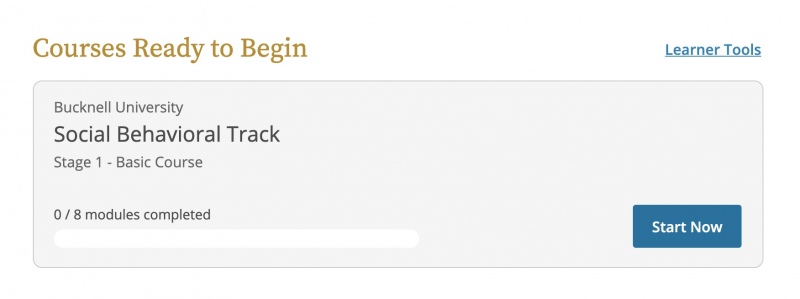
- Click on the 'Start Now' button to begin taking the course; you may start and stop the course as you find convenient.
- When you have passed your course, you will have an opportunity to download your completion report for inclusion in your IRB application in the final step. To do so, click 'View - Print - Share Record' then 'View / Print' for either the provided options (either is acceptable; you do not need to provide both in the IRB process).
CITI Training: *Renewing* your Social Behavioral Track Certificate
CITI Training certificates are valid for two years from their receipt (the expiration date should be on your certificate). Users who have already completed a social behavioral track course may sign up for a shorter "refresher" course as follows:
- Log in to the CITI Program website using the username you've previously established (do not use the 'Log in through my organization' link, as it will not show Bucknell as an option. If you have completed CITI training at another institution, you should be able to change your affiliation via the buttons on the main page.
- On the main menu of your CITI Program page, click the 'Add a Course' button.
- Skip Question 1; under Question 2, check the Social Behavioral Track and submit.
Note: unless you are required (e.g., by a granting organization) to complete the Responsible Conduct of Research (RCR) training, you do not need to do this for an IRB proposal; leave Question 3 blank (or select 'Not at this time.'). - Click on the 'Start Now' button to begin taking the course; you may start and stop the course as you find convenient.
- When you have passed your course, you will have an opportunity to download your completion report for inclusion in your IRB application in the final step. To do so, click 'View - Print - Share Record' then 'View / Print' for either the provided options (either is acceptable; you do not need to provide both in the IRB process).
Downloading a certificate from a previously completed training course:
If you need to download a new certificate from a previously completed course, simply scroll to the Completed Courses section on your CITI Program dashboard and click 'View - Print - Share Record' for the relevant course, then 'View / Print' for either the provided options (either is acceptable; you do not need to provide both in the IRB process).